Design Contest - since 2003 - custom graphic design done affordable

9 AM - 8 PM PST

+ Reply to Thread
Results 1 to 13 of 13

Thread: Logo Design

  1. #1
    Registered User backedspace is on a distinguished road backedspace's Avatar
    Join Date
    Jan 2009
    City, State
    Vancouver, Canada
    Posts
    13

    Logo Design

    Hello design community!
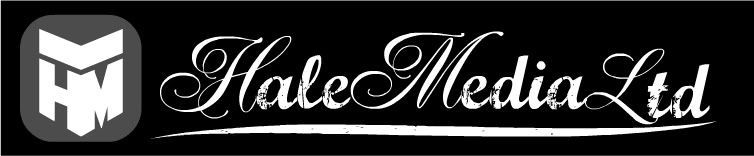
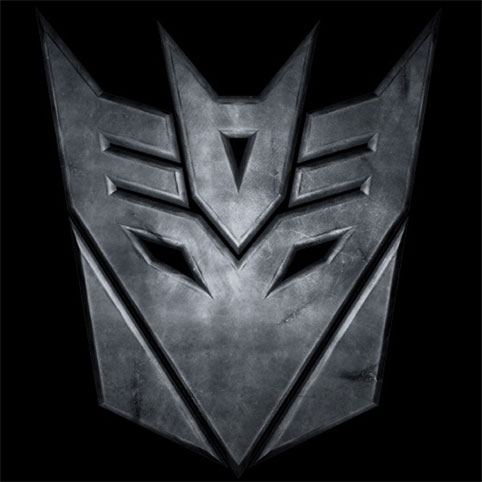
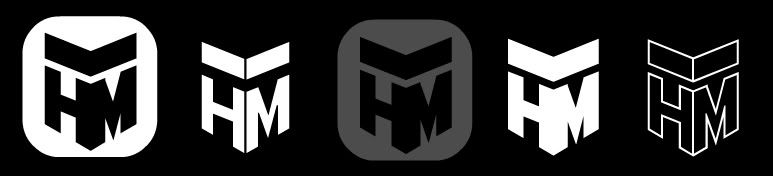
    With new intentions to market myself, I've chosen a business name and started to flush out a design. ...I'm aware that it somewhat resembles the transformer icon, and I'm hoping this isn't as bad, or distracting, as it may seem?

    any feedback would be appreciated, Thanks!


  2. #2
    Elite Designer Chung Dha is a splendid one to behold Chung Dha is a splendid one to behold Chung Dha is a splendid one to behold Chung Dha is a splendid one to behold Chung Dha is a splendid one to behold Chung Dha is a splendid one to behold Chung Dha is a splendid one to behold Chung Dha's Avatar
    Join Date
    Jul 2007
    City, State
    The Netherlands
    Posts
    1,487
    Try using perfect isometry cause I see the top and bottom have different angles. Also try making it into a cube cause the high shaped logo's is not pleasant for eyes cause people have horizontal eyes and rather see wide shape or perfect sqaure but not a high object.

    Also use font that is in the same range of your logo and not something totally does not fit in the picture. Cause at the moment is looks like 2 different companies next to each other. And don't add a box around it is does not help and make it less simple.

  3. #3
    Registered User backedspace is on a distinguished road backedspace's Avatar
    Join Date
    Jan 2009
    City, State
    Vancouver, Canada
    Posts
    13
    Quote Originally Posted by Chung Dha View Post
    Try using perfect isometry cause I see the top and bottom have different angles. Also try making it into a cube cause the high shaped logo's is not pleasant for eyes cause people have horizontal eyes and rather see wide shape or perfect sqaure but not a high object.

    Also use font that is in the same range of your logo and not something totally does not fit in the picture. Cause at the moment is looks like 2 different companies next to each other. And don't add a box around it is does not help and make it less simple.
    Hey Chung, thanks for the suggestions! I never considered the idea of wide shapes vs high shapes, interesting. I'll be playing around with this a bit more and post an update.

    Thanks!

  4. #4
    Gerhard Schlee
    Guest
    Looks like the Decepticons (from Transformers) icon... http://www.pixelhivedesign.com/Tutor...icons_logo.jpg

  5. #5
    Registered User PixelFuze is on a distinguished road
    Join Date
    Jan 2009
    City, State
    Canada
    Posts
    48
    I would suggest you also try to make the text next to the icon match. It looks way off right now and not even apart of the logo. Try something more solid and thick as a font.

  6. #6
    Registered User awhipl is on a distinguished road awhipl's Avatar
    Join Date
    Jan 2009
    City, State
    CA
    Posts
    62
    first thing i thought about doing was finding a picture of autobots/decepticons symbol

  7. #7
    Registered User backedspace is on a distinguished road backedspace's Avatar
    Join Date
    Jan 2009
    City, State
    Vancouver, Canada
    Posts
    13
    Thanks to all for the feedback.
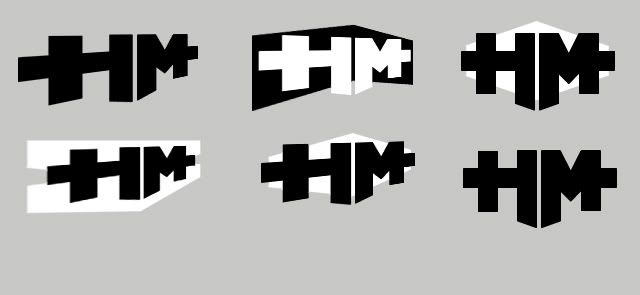
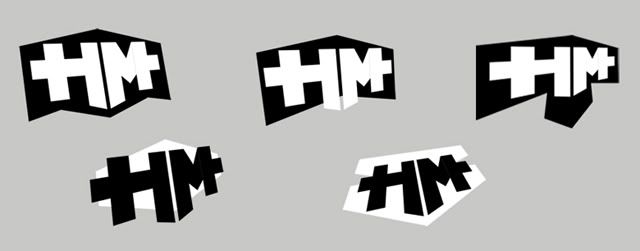
    I've decided to explore new directions, as the consensus of my first version comes too close to a transformers/decepticons icon.

    I'm not sure if this is any better, from a design standpoint, but its hopefully an improvement... i tried to make it less vertical, less robot icon-ish.


    any feedback would be appreciated.
    Thanks!
    Last edited by backedspace; 02-05-2009 at 09:44 PM. Reason: img

  8. #8
    Registered User Cicy is on a distinguished road
    Join Date
    Feb 2009
    Posts
    8
    The fifth one in the first row looks more attractive.

  9. #9
    Registered User LoShu is on a distinguished road
    Join Date
    Dec 2008
    City, State
    The Netherlands
    Posts
    11
    I think the isometric feel could be applied to these new designs. Apply it to the second logo in the second image. Get the black background to look like it's flipped to the back (like it is now) and get the white letters in isometric look like your first design (Transformers) to pop out to the front. Hope you understand what I mean. ;-)

  10. #10
    Registered User nsenarathne is on a distinguished road
    Join Date
    Feb 2009
    Posts
    9
    The sixth one in the first row is more nicer than other ones. think abt.business name font and design. i think its too old school.

  11. #11
    Registered User mashke is on a distinguished road
    Join Date
    Mar 2009
    City, State
    Vilnius
    Posts
    13
    It go for number 6, in first picture removed all the clutter and kept it simple

  12. #12
    Registered User will100 is on a distinguished road
    Join Date
    Mar 2009
    Posts
    1

    Cheap Logo creatio/conversion

    Hi,

    I am using Illustrator and Corel for logo conversion and logo creation both.
    Please give me some tips about it.

    Thanks

    Will

  13. #13
    Elite Designer .:FMD will become famous soon enough .:FMD will become famous soon enough .:FMD's Avatar
    Join Date
    Mar 2009
    City, State
    Mile High City
    Posts
    206
    is it just me or does the flat tops of the H and M look a little awkward since the inside of the letters are angled... I like the concept, but I think you should keep at it. I feel that the very first set is probably your best set.

    What Chung was saying is that your angles on the top of the HM and the arrow element, are not the same degree/pitch as the bottom of the HM...if you get those the same you will have perfect isometry.

    Ill upload to show you what he means.
    Attached Images  
    Last edited by .:FMD; 03-25-2009 at 03:27 PM.

Bookmarks

Posting Permissions

  • You may not post new threads
  • You may not post replies
  • You may not post attachments
  • You may not edit your posts
  • Find a contest
  • Participate and win
  • Get cash prize
Designers Join Us